

Nicegram vs. Telegram: How to Use Nicegram – Full Introduction & Guide


If you think Telegram is the limit of convenience and flexibility among messengers, then it is worth getting acquainted with Nicegram. This is a non-standard Telegram client that retains all the features of the original app, complementing them with additional features that many users lack.
That is why the comparison of Nicegram vs. Telegram has become especially popular: some want to expand the usual functionality, others want to increase privacy, or gain more control over the interface and content.
In this guide, let’s figure out what Nicegram is, why there’s so much interest around it, and how a beginner can quickly master all its features. In this article, you will learn how to use Nicegram from the very first minutes and how it differs from the classic Telegram — briefly, clearly, and exclusively to the point.
*Discover: The Main Difference Between Telegram and Telegram X: What’s Better to Use?
What is Nicegram Telegram Client and Why It Exists
Nicegram is not just another messenger, but an advanced client built on top of the Telegram ecosystem. It runs on the same platform, retains the familiar interface and compatibility with all Telegram functions, but complements them with something that many users noticeably lack.

In fact, Nicegram appeared as a response to a community request: people need more flexible settings, convenient chat management tools, and additional privacy features. The standard Telegram is universal, but it does not always allow you to customize the application to your personal style of use.
In this approach, Nicegram closes this niche by offering advanced filters, hiding unwanted chats, subtle personalization, and other amenities that make daily communication easier and more comfortable.
How Nicegram Connects to Telegram While Offering Its Own Experience
Nicegram relies on Telegram’s technical base, but interprets the familiar messenger in its own way. It uses the same cloud and synchronizes all your conversations in real time, so switching to the client is literally effortless. At the same time, Nicegram does not copy Telegram — it develops its idea, adding flexibility, which is so lacking in the standard app.
In Nicegram, you can fine-tune the interface, control the display of tabs, hide unnecessary content, and use advanced privacy tools. The absence of built-in client restrictions makes working with the application freer and intuitive.
As a result, Nicegram remains part of the Telegram ecosystem, but it offers a more personalized, open, and user-friendly communication format.
Nicegram Telegram – Key Features You Should Know Before Using It
Before switching to Nicegram, it’s worth knowing that this client offers a more flexible approach to working with Telegram. It expands standard features by conveniently organizing chats, customizable tabs and filters, and additional privacy and interface personalization tools.
In the following sections, let’s analyze each function in detail and show how they make using the messenger more comfortable and individual.
Custom Tabs, Smart Filters, and Improved Navigation in Nicegram
Imagine that your Telegram has turned into an overflowing warehouse of messages: chats, groups, and channels — all mixed into one stream. Nicegram solves this problem with custom tabs and smart filters. You create your own tabs for work conversations, personal chats, or favorite channels, and filters automatically show only the messages you need.
Navigation becomes natural: the desired dialog can be found in seconds, without scrolling through dozens of chats. As a result, each user gets a sense of order and control, even if their messenger is filled with dozens of active groups and channels.
*Note: Nicegram turns chaos into an organized and convenient space for communication.
Privacy Options That Go Beyond Standard Telegram Settings
Also, Nicegram extends Telegram’s standard privacy features by offering tools that are not available in a regular client. Hidden chats allow you to completely remove correspondence from the general list and open it only when you enter your password.
Password protection extends not only to individual chats but also to entire sections of the application, which provides an additional level of security. Additionally, flexible privacy settings are available, managing the visibility of contacts, notifications, and content, which allow you to control who sees what in your messenger.
Interface Customization: Themes, Layouts, and Display Controls
Moreover, in Nicegram, the interface transforms from a standard set of functions into a flexible tool for your needs. You can choose the design of the app, change the location of chats and controls, and adjust everything to your own style.
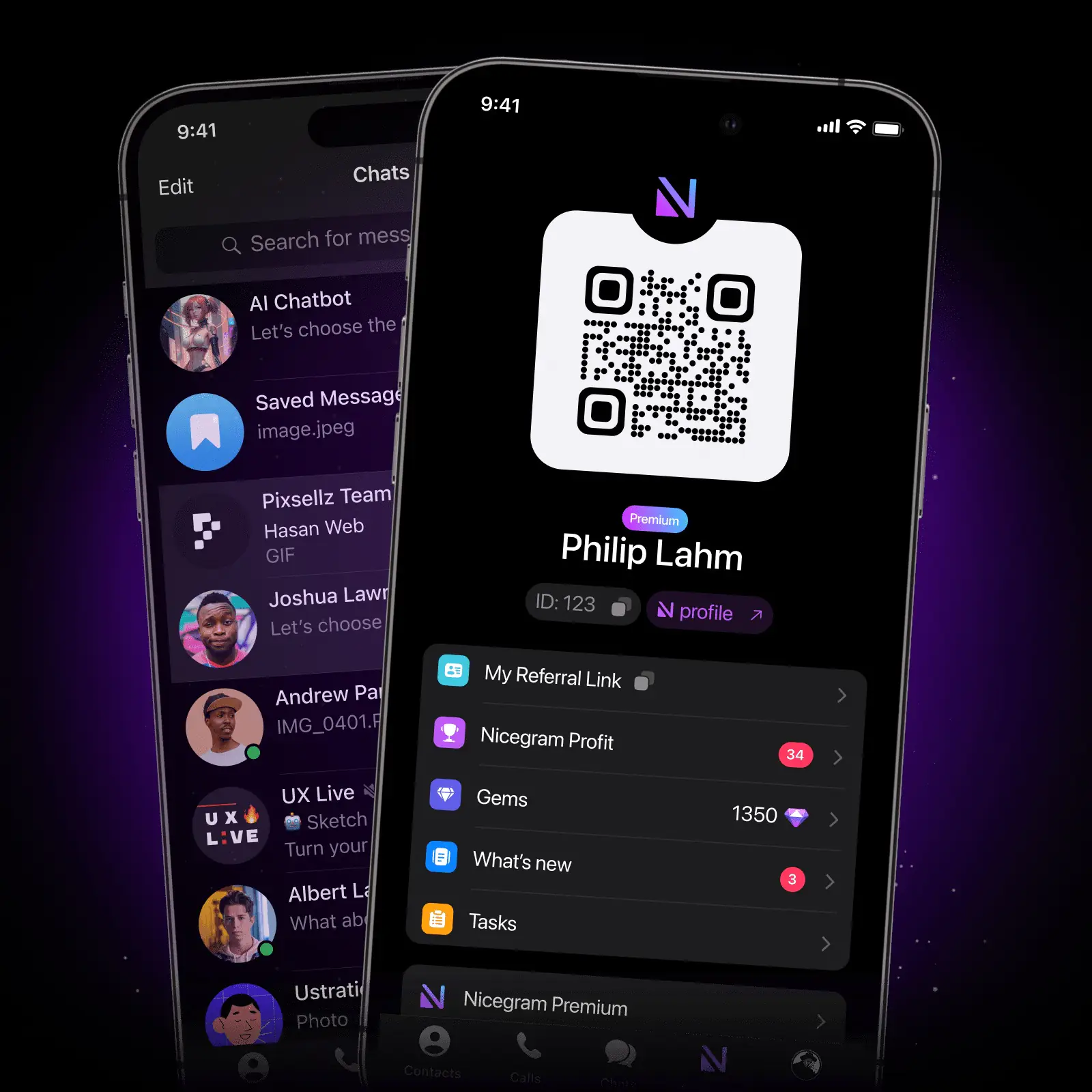
Even small details — the order of the tabs, the visibility of the panels, or the location of the buttons — can be adapted to make the messenger work the way it suits you. The result is a personalized communication space where each function is tailored to the user’s habits, rather than the other way around.
Nicegram vs. Telegram – A Clear Side-by-Side Comparison
Even though Nicegram vs. Telegram are built on the same technical base, but their philosophy of use is markedly different:
- Design philosophy: Telegram adheres to minimalism and versatility; Nicegram relies on personalization and flexibility.
- Features: Telegram offers a standard set of chats, channels, and bots; Nicegram adds hidden chats, tabs, filters, and advanced privacy settings.
- User-friendliness: Telegram is simple and familiar to most; Nicegram takes a little time to set up, but gives you more control over the interface.
- Limitations: Telegram imposes client restrictions on content and chat management; Nicegram removes some of these limits.
- Audience type: Telegram is suitable for a wide audience; Nicegram is aimed at advanced users who value privacy and personalization.
As a result, Nicegram transforms the familiar messenger into a more flexible and customized tool, while maintaining compatibility with Telegram.
What Nicegram Adds That Telegram Does Not Include by Default
Nicegram offers something that is not available in standard Telegram. In addition to improved chat sorting with customizable tabs and filters, enhanced navigation and productivity features, additional privacy features are implemented here: hidden chats, password protection, and flexible content visibility control.
Also, Nicegram allows you to bypass the limitations of the standard client — users can view channels and groups blocked in Telegram, which makes access to information more free and open. All of these features turn Nicegram into a tool for more personalized, productive, and secure communication.
*Discover: How to Spy on Telegram Legally? Get Acquinted with Nicegram.
Nicegram App Telegram — How to Install and Start Using It
It’s easy to get started with Nicegram, even if you’ve never used alternative Telegram clients. First, you just need to download the app from the official store or from the developer’s website and install it on your smartphone.
At the first launch, you will be greeted by the familiar Telegram login screen: just confirm your account, and all your chats, channels, and contacts will immediately appear in Telegram, without unnecessary postponements.
After that, you will get some opportunities that are not available in the standard messenger: you can enable hidden chats, configure tabs and filters, set passwords for individual sections, and customize the interface design to suit your style.
Just a few steps — and the familiar Telegram turns into a flexible, personalized communication Nicegram tool, where each function adapts to you.
Step-by-Step Guide to Configuring Nicegram After Installation
After installing Nicegram, it is essential to configure the application so that it works as conveniently as possible for you.
Step 1: Setting up tabs. Create your own categories for chats: work, personal, channels, or bots. This will allow you to quickly switch between the desired sections.
Step 2: Select filters. Set up the display of messages by type: unread, group, channels, or bots. Filters help you quickly find what’s important and eliminate unnecessary noise.
Step 3: Organization of chats. Hide unnecessary conversations, pin important ones, and group conversations to make the chat list compact and understandable.
Step 4: Privacy settings. Activate hidden chats, set passwords for individual sections, and adjust the visibility of contacts and notifications.
These simple steps transform Nicegram into a personalized, secure, and user-friendly messenger, ready for daily use.
How to Sync Your Nicegram Setup Across Devices
Nicegram makes full use of Telegram’s cloud infrastructure, so your chats, channels, and files sync automatically across all devices.
When switching between a smartphone, tablet, or PC, users see the same correspondence, tabs, and filters. The interface and privacy settings are also saved, although some functions, such as passwords for hidden chats, may require reauthorization.
Nicegram Telegram Alternative — Who Actually Needs It?
Telegram is not just another messenger, but a tool for those who want to take full control of communication. Experienced users appreciate it for the ability to structure dozens of chats and filter information so that important things are always at hand. Content managers and channel administrators see Telegram as a convenient way to manage groups and quickly track subscriber activity.
For those who value privacy, the app offers hidden chats, passwords, and advanced visibility controls, turning the familiar Telegram into a secure and personalized space.
As a result, Nicegram becomes the choice of people who want not just to communicate, but to do it conveniently, efficiently, and safely.
Use Cases Where Nicegram Performs Better Than Telegram
Nicegram shows its advantages, especially in scenarios where the standard Telegram is limited. Managing multiple communities is made easier by customizable tabs and filters: workgroups, personal conversations, and channels can be structured separately, providing quick access to the information you need.
With a high volume of messages, intelligent filters allow you to select only unread or priority messages, which saves time and reduces information noise. Chats or media — photos, videos, and documents — are organized logically, providing convenient search and access to materials.
Additionally, Nicegram enhances privacy: hidden chats, password protection, and flexible content visibility settings create a safe space for personal and work correspondence. These features make Nicegram the preferred tool for advanced users, channel administrators, and those who value productivity and control over information.
Try Nicegram Today to Unlock a Smarter Telegram Experience
It is high time to appreciate how the familiar Nicegram is turning into a more convenient and flexible tool. Do not forget that advanced tabs and smart filters help you navigate dozens of chats quickly, improved navigation saves time, and hidden chats and password protection enhance privacy.
Download Nicegram, customize the interface for yourself, and test all the features: personalized tabs, filters for messages and media, as well as additional security features. It’s an easy way to make messaging faster, more comfortable, and safer.